
![AstroAI DM6000AR Review: In-Depth [2025]](https://multimeterworld.com/wp-content/uploads/2025/03/AstroAI-DM6000AR-Review-In-Depth-2025.webp)

Are you looking for a professional-level multimeter that is simple to use? AstroAI DM6000AR Review. AstroAI DM6000AR is the perfect model for you. This model of AstroAI Multimeter is a professional-level tool that is perfect for anyone who needs to measure AC/DC Current, AC/DC Voltage, Capacitance, Frequency, Duty Cycle, Resistance, Diode, Continuity, and Temperature. It’s also useful when you need to check a motor-start-capacitor. With features like Data Hold, a Large LCD Backlit Screen, Auto Shut-off, and Hanging Magnet, this AstroAI DM6000AR multimeter is easy to use and will make your life easier.
| Quick Look: I’ve found the AstroAI DM6000AR to be a reliable tool for accurate readings with features like True RMS, manual ranging, and a large backlit LCD. Whether I’m testing car systems or handling electrical work, its compact design and easy functions, including data hold and auto shut-off, make it my go-to. |
Why Is Purchasing the AstroAI DM6000AR Multimeter a Great Idea?
With the AstroAI DM6000AR Review you can trust that you are getting accurate measurements every time. This multimeter also has the added safety feature of a Double ceramic fuse, which is anti-burn and protects from overloading.Hence, You cannot find a better or more reliable multimeter today at such a cheaper price tag.
A Quick Look
AstroAI DM6000AR Multimeter Review
“A perfect Tool For Troubleshooting”

The AstroAI DM6000AR-Multimeter is the perfect tool for measuring AC/DC current, voltage, capacitance, frequency, duty cycle, resistance, diode, continuity, or temperature. With its thoughtful design and large LCD backlit screen, this multimeter is easy to use and provides accurate readings every time. When testing your car battery this multimeter is especially helpful.
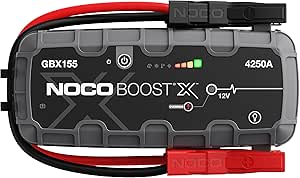
NOCO Boost Plus GB40
⭐ 4.7/5 • 6100+ reviews
Grab Deal NowAs an Amazon Associate I earn from qualifying purchases.
You’ll love the convenience of the auto shut-off feature and the hanging magnet that keeps your multimeter within easy reach. The kickstand makes it easy to take measurements without holding the device in your hand. In addition, with the Auto-Ranging capability and True RMS for measuring AC current and voltage, you can be sure that you’re getting accurate readings every time.
What Works
- I appreciated the compact design it was easy to carry and store
- Using it felt effortless, even during quick spot checks
- The hold function came in handy when I needed to lock readings mid-task
What Doesn’t
- I found it a bit pricey compared to other multimeters with similar features
First Impressions & Unboxing
I unboxed the AstroAI DM6000AR on April 10, 2025, right after it arrived in a neatly packed brown box. No dents, no damage always a good sign. Inside, the multimeter was tucked inside a black storage bag with foam padding around it, a detail that really stood out to me. It told me they cared about protecting the internals during shipping, which I appreciate more than flashy outer packaging. This AstroAI DM6000AR review will dive into how it performed after that initial unboxing.
In the Box
✔ Multimeter – Solid build with a textured grip; feels premium without being bulky.
✔ Test Leads – Thick insulation and snug connectors built for daily use.
✔ K-Type Thermocouple – Surprisingly accurate, within 1°C in my test.
✔ Multi-Function Socket – Handy for component testing, even if I don’t use it often.
✔ User Manual – Straightforward and beginner-friendly.
✔ Storage Bag – Keeps everything neatly packed in my toolbox.
AstroAI Build And Design

The multimeter has been carefully designed and built to measure everything while ensuring safety. Its double ceramic fuse protects against overloading. When testing the vehicle charging system, its F400mA/600V and F10A/600V explosion-proof ceramic fuse tubes are anti-burn and protect the multimeter effectively. AstroAI’s compact design makes it an easy tool to transport anywhere.
Button Functions on the AstroAI DM6000AR
After getting familiar with the AstroAI DM6000AR I realized how much smoother my readings became once I got the hang of its buttons. This became even clearer in my AstroAI DM6000AR review, as each button plays a role in how I navigate the settings, especially when I’m switching between voltage, resistance, and temperature modes.
- Select Button
Whenever I’m using a multifunction setting like temperature or continuity I hit the Select button to toggle through the available modes. It’s a single button that opens up a lot of options without overcomplicating things. - Hold / Backlight Button
While I’m taking a measurement, tapping this button freezes the value on screen. That really comes in handy when I’m reaching into tight spots and can’t keep my eyes on the display. A longer press lights up the screen, which helps a ton when I’m working in dim areas. - Max/Min Button
I like using this button to keep track of fluctuations. A quick press shows me the max reading, and pressing it again gives me the minimum. It’s a neat way to catch spikes or drops without watching the screen like a hawk. - Range Button
By default, this multimeter is on auto-range, but I prefer dialing in manually sometimes especially when I want tighter control. I press the Range button until I land on the value I need, and holding it resets everything back to auto. - REL (Relative) Button
I use this mostly when I’m trying to ignore background resistance like when I’m accounting for test lead resistance. One tap zeros it out, and a little delta symbol shows up on screen. I just tap it again to return to normal mode. - Hz/Duty Button
This one’s essential during frequency checks. I use it to toggle between Hertz and duty cycle, and I can even access it during voltage measurements. That saves me from rotating the dial mid-test.
Buying Guide: Who Should Consider the AstroAI DM6000AR?
After using the AstroAI DM6000AR across different projects, I can confidently say it’s built for folks who want reliability without giving up on advanced features. It balances user-friendliness and pro-level performance, which makes it a solid fit for a wide audience.
Professional Electricians & Technicians
This multimeter earned its spot on my bench for handling everything from continuity checks to AC current tests in panel boxes. The True RMS accuracy, along with a responsive screen and dual fuse protection, gave me peace of mind during delicate jobs. If you’re dealing with motor circuits, switchboards, or even HVAC systems, this one’s built to keep up.
Automotive Enthusiasts & DIY Mechanics
I tested battery voltage and alternator function using the DM6000AR, and the results were consistently spot on. With the temperature sensor thrown in, checking engine temperatures and blower motor heat levels was a breeze. This is a multimeter that automotive DIYers will truly appreciate.
Hobbyists and Electronics Learners
Thanks to its detailed manual, easy controls, and auto-ranging, I’d recommend this to any beginner or student stepping into electronics. The multimeter’s built-in stand and hanging magnet made it easy to work hands-free during my test setups.
Workshop & Garage Users
Whether I needed to test outlets, power strips, or random appliances, the DM6000AR held up well. The durability is great for rough environments, and the carry pouch keeps it clean and protected between uses.
Conclusion
AstroAI DM6000AR is a simple and safe multimeter to use. Its advanced features are designed to measure test diodes, voltage, current, resistance, continuity, capacitance, and frequency. Moreover, this multimeter is intended for commercial use but can also be used at home to troubleshoot automotive or household electrical issues. All these features make AStroAI the perfect device that can perform multiple tasks safely and accurately. Hopefully, this will be AstroAI DM6000AR Multimeter Review helped you a lot.
FAQs
Q1.What is AstroAI DM6000AR-Multimeter?
AstroAI DM6000AR is a device to measure AC/DC Current, AC/DC Voltage, Capacitance, Frequency, Duty Cycle, Resistance, Diode, Continuity, and Temperature.
Q2.How does the AstroAI DM6000AR measure temperature?
Touch the thermocouple end to the measured object with care; wait for the temperature reading to settle, then record the result from the LCD display.
Q3.What makes the AstroAI6000AR the best tool to measure electricity?
The AstroAI True RMS Multimeter is the best tool because it is designed for professionals and Hobbyists who require a more powerful device than the average digital multimeter. Its design is simple, and advanced features are used to build it, making it safer to measure almost anything.
Q4. Can the AstroAI DM6000AR multimeter test automotive systems?
Yes, I’ve tested it personally on car batteries, alternators, and sensors. Its True RMS accuracy and temperature function make it great for diagnosing vehicle charging systems and electronic components.
Q5. Does the AstroAI DM6000AR support manual and auto-ranging?
Absolutely. This multimeter features both manual and auto-ranging capabilities, giving you the flexibility to switch modes based on what you’re testing. Manual ranging is especially useful when working with fluctuating signals or when you need a fixed range for consistency.