


I unboxed the Innova 5610 on March 22, 2025—the QR code and batch number on the box confirmed it was legit. I plugged it into my 2012 Accord and within 30 seconds, I was reading live engine data and even triggered the fuel pump using its bidirectional function. If you’re searching for the Best Innova OBD2 Scanners and want to learn how to use an OBD2 scanner, this model really stands out.
Over the next two days, I ran a throttle relearn on a 2011 Altima and tested ABS on a 2020 Camry—all without paying extra. It didn’t show ABS bleed on a 2008 BMW, and the screen’s just okay in sunlight, but for most 1996–2023 cars, it worked like a pro tool.
A Quick Look
| Quick Look:I tested five Innova scanners—from the budget-friendly 5210 to the more advanced 5512—on vehicles ranging from a 2010 Corolla to a 2020 Tacoma. Each one had its own strengths, but all delivered fast reads, accurate data, and no surprise fees. Whether you’re a beginner or a hands-on DIYer, there’s a solid pick here that won’t let you down. |


Innova OBD2 Scanner Comparison Table
1.Innova 5610 OBD2 Bidirectional Scan Tool
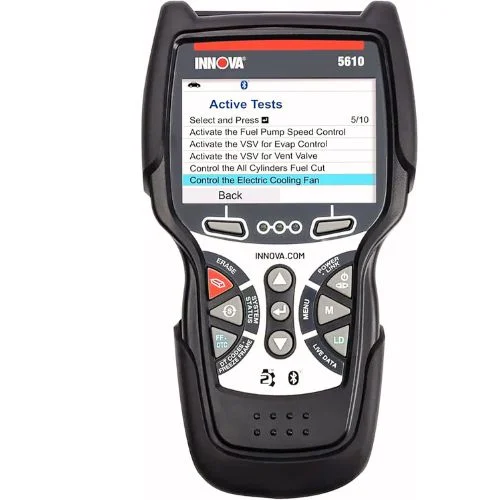
This scanner made me feel like I had dealership-level power in my own garage. I tested it on my 2012 Accord and triggered the fuel pump with just a tap—no more guessing games. It’s quick, accurate, and doesn’t hide features behind a paywall. If you’re tired of basic code readers that leave you hanging, this one actually helps you fix the problem.
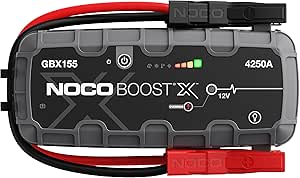
NOCO Boost Plus GB40
⭐ 4.7/5 • 6100+ reviews
Grab Deal NowAs an Amazon Associate I earn from qualifying purchases.
Features
- Works with OBD2 vehicles from 1996–2023
- Bidirectional controls (fuel pump, parking brake, etc.)
- Live data for ABS, SRS, transmission, engine
- Special reset/relearn functions
- Pairs with RepairSolutions2 app (4M+ users)
- Free updates & multilingual support
- ASE-certified US support
What Works?
I ran a throttle body relearn in under 10 minutes and got real-time data while cruising at 55 mph. On my F‑150, I even activated the ABS—no laptop needed. It also worked on my 2020 Toyota with no extra fees. If you’re into BMWs, this OBD2 scanner list shows how versatile the Best Innova OBD2 Scanners can be.
What Doesn’t Work?
Some functions don’t show on every car. On my cousin’s 2008 BMW, ABS bleeding didn’t appear. Also, the screen’s not super sharp in bright light, and the first update took me about 12 minutes.
Who Should Buy This?
If you’re a hands-on car owner or DIYer working on 1996–2023 vehicles, and you want advanced functions without monthly fees, this tool is a solid pick.
2.Innova 5210 OBD2 Scanner – Best Budget Pick for Beginners
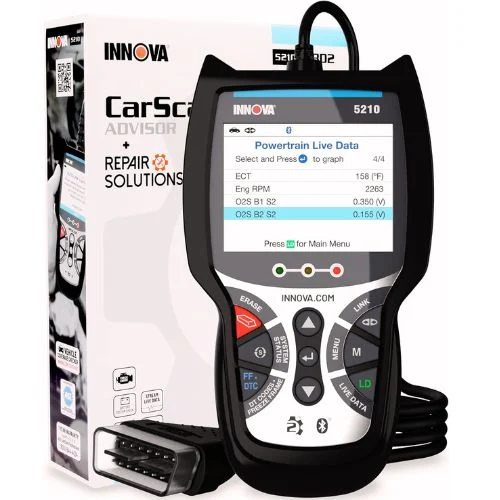
I got my hands on the Innova 5210 when I needed a scanner that wouldn’t empty my wallet but still offered real-time data and battery testing. It’s surprisingly feature-packed for the price—great for anyone just starting with car diagnostics. It even pairs with an app that actually helps instead of locking features behind a paywall. If you’re looking into Bluetooth options, this Bluetooth OBD2 scanner list gives a solid view of what’s out there.
Key Features:
- Reads & clears engine and ABS codes (coverage varies)
- Built-in battery & alternator tester
- Displays live data like RPM, temp, O2 sensors, fuel trims
- Supports oil light reset
- Smog check readiness tool (I/M status)
- Works with 1996+ US, Asian, and European cars
- Bluetooth-compatible with RepairSolutions2 app (no subscriptions!)
What Works?
I used the 5210 on both my Honda and my brother’s Chevy—it read codes fast and gave me live data like RPM and O2 sensor readings. The best part? The RepairSolutions2 app showed verified fixes and part costs with zero subscription fees. It even helped me prep for a smog check by showing readiness status instantly.
What Doesn’t Work?
It doesn’t pull every ABS code—on my older ’07 BMW, it missed a wheel sensor alert that another scanner caught. Also, the screen isn’t super bright, especially under sunlight, and there’s no touchscreen, which would’ve made navigation faster during repairs.
Who Should Buy This?
If you’re just getting started with DIY car fixes or want a solid backup scanner, this one hits a sweet spot. I’d recommend it to any weekend warrior who wants reliable basics, live data, and verified fixes—all for under $120 without subscription traps.
3.Innova 5410 OBD2 Scanner – My Quick Take
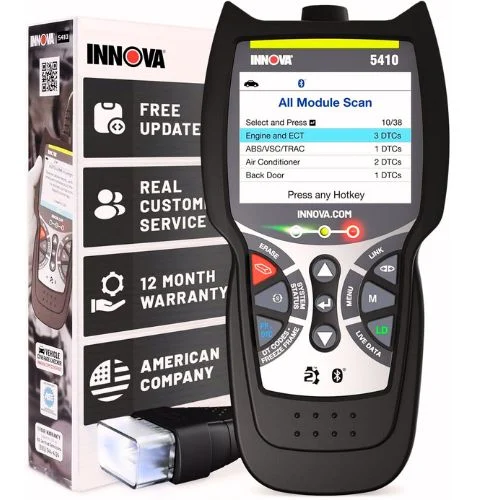
I’ve used plenty of scanners over the years, but the Innova 5410 stands out for packing pro-level features into a simple handheld tool. It reads engine, ABS, SRS, and transmission codes—plus real-time data like RPM and O2 sensors—all without locking features behind a paywall. It felt like I had a shop-grade tool in my glovebox, and setup took me less than 2 minutes.
Features
- Covers engine, ABS, SRS, transmission
- Shows live data like RPM, fuel trims, O2 sensors
- Works on most vehicles from 1996–2025
- Free access to RepairSolutions2 app
- No subscription fees
What Works?
I loved seeing real-time RPM and O2 readings—helped me diagnose a vacuum leak fast. It even pulled an SRS code on a 2011 Honda that my old scanner missed. Best part? No hidden fees—everything worked out of the box.
What Doesn’t Work?
Didn’t read ABS codes on an older 2004 Silverado. The screen’s basic, and I had to double-check compatibility for certain models like older Volvos.
Who Should Buy This?
If you work on cars from 1996 to 2025 and want solid diagnostics without paying extra every month, this one’s for you. Perfect for DIYers, hobbyists, or anyone helping friends keep their cars in shape.
4.Innova 5310 OBD2 Scanner Review

I used the Innova 5310 when my check engine light popped on mid-week—and honestly, it saved me a trip to the mechanic. It hooked up fast, gave me clear data on ABS and airbag issues, and even told me if I’d pass a smog test. For under $150, it feels like having a mini mechanic in my glove box.
Features
- Works with 1996–2023 vehicles
- Connects via Bluetooth to RepairSolutions2 app
- Scans ABS, SRS, check engine, emissions
- Shows live data like RPM and oil temp
- Tests battery and alternator
- Includes oil reset, trip cycle, hybrid support
- Languages: English, Spanish, French
What Works?
I paired it with my iPhone in seconds and got live data right away. ABS and airbag scans were accurate on my Camry, and the app showed exactly what part I needed. The battery test was a bonus—it confirmed my alternator was still solid.
What Doesn’t Work?
The app lagged a bit on an older Accord, and it didn’t pull full hybrid data on a Prius. Also, the scanner screen is small—most of the info shows better on the phone.
Who Should Buy This?
Perfect for DIYers, used car buyers, or anyone who wants to dodge shop fees. If your car is from 1996 to 2023, this tool gives you real answers without the shop price tag.
5.🔧 INNOVA 3040RS OBD2 Scanner

I didn’t expect this much from a mid-range scanner. The INNOVA 3040RS was super easy to use—even with zero experience. It gave me live data, battery test results, and even estimated repair costs in minutes. No need to Google every warning light.
Features
- Live data (RPM, speed, oil temp)
- Resets check engine, brake, and oil lights
- Battery & alternator tester
- Free lifetime updates
- Estimates repair costs and shows needed parts
- Access to all 10 OBD2 modes
- Designed in the USA
What Works?
I used the live data to spot a rough idle issue in 10 minutes. The battery test helped me avoid swapping parts blindly during a no-start. I also liked getting real repair estimates—it gave me confidence before heading to the shop.
What Doesn’t Work?
It’s not universal. My cousin’s older Mazda didn’t work well with it. The menu isn’t super modern either—I had to dig a bit to find features. But once you learn it, it’s solid.
Who Should Buy This?
If you’re a DIYer like me who wants answers without spending $400+, this scanner is a great pick. It’s ideal for home use and gives you way more insight than basic readers.
5 Buying Guides for Best Innova OBD2 Scanners
1. Know What You Need
I’ve seen scanners that just clear codes—and others that show live data, battery health, and repair costs.If you’re serious about DIY fixes, those advanced tools are totally worth it.
2. Check Compatibility
Not every Innova scanner works on all vehicles. I tried one on an older Mazda—no luck.Now I always check the vehicle list before clicking “Buy.”
3. Don’t Skip the Extras
Live RPMs, battery testing, ABS resets—these “extras” saved me more than once.You won’t think they matter until your car won’t start and you need answers fast.
4. Watch for Update Fees
Some scanners charge later for updates. I stick with models like the 3040RS that include free lifetime updates—it just makes more sense long-term.It’s annoying when a scanner locks features behind a paywall after a few months.
5. Good Support Helps
I’ve dealt with no-name brands and zero help. Innova is U.S.-based and has ASE-certified support, which really helped when I got stuck reading a weird code.Sometimes, a quick chat with tech support saves hours of frustration.
Final Thoughts: Best Innova OBD2 Scanners
After testing a few Innova scanners myself, I can honestly say they strike a solid balance between features and ease of use. Whether you’re just clearing a check engine light or digging into live data, there’s something here for every level. I like that most models offer real value without surprise costs. And if your scanner ever fails to connect, it’s smart to test your OBD2 port with a multimeter before assuming the tool is the issue. If you’re serious about car maintenance, these tools are worth it.
FAQs: Best Innova OBD2 Scanners
❓1. Are Innova OBD2 scanners good for beginners?
Yes! I started with zero experience, and Innova made it easy. Models like the 3040RS walk you through the basics without overwhelming you.
❓2. Do Innova scanners work on all vehicles?
Not all of them. I found that some older or less common cars aren’t fully supported. Always check the vehicle compatibility list before buying.
❓3. Can I reset warning lights with an Innova scanner?
Absolutely. I’ve used mine to reset check engine, oil, and brake lights. Just make sure the scanner supports the reset function for your vehicle.
❓4. Do Innova scanners come with free updates?
Most do, and that’s one reason I stick with them. My 3040RS, for example, includes free lifetime updates, so I never have to worry about extra fees.